
How to Set Up URL redirection in Squarespace using Code
You want to redirect your page, but is that not possible with Squarespace's existing capabilities? Good news is: I might have a solution for you.
URL Mappings Won’t Work For Your Case
You can use URL Mappings in Squarespace to redirect your page; however, it is only possible for inactive pages. If you want to redirect your active page, you can add some code in the code injection area. I will show you how to do that.
Please note that you need the Core Plan or higher to add codes in the code injection area.
Step #1: Add jQuery Library to Your Code Injection Header Area
Since we will be using jQuery for URL redirection, we first need to add the jQuery library to the code injection header area.
Please Add Your jQuery library.
<!--JQUERY LIBRARY-->
<script src="https://ajax.googleapis.com/ajax/libs/jquery/3.5.1/jquery.min.js"></script>

Step #2: Add Codes That Redirect Your URL
I use jQuery for the URL redirection.
It says that when a user clicks any URL with yoursitename.com/hello, the page will redirect to ‘https://caribou-gardenia-gtnj.squarespace.com/’.
Please note that if you are redirecting the page to your own website, you only need to display the URL slug. For example, my page is https://caribou-gardenia-gtnj.squarespace.com/hello, but I only show “/hello” here. If it is not a URL on your site, you need the full URL here.
<script>
$(document).ready(function() {
$("a[href='/blog']").click(function(event) {
event.preventDefault();
window.location.href = 'https://caribou-gardenia-gtnj.squarespace.com/?=noredirect';
});
});
</script>
Step #3: Where Should You Add Your Codes?
Option #1:
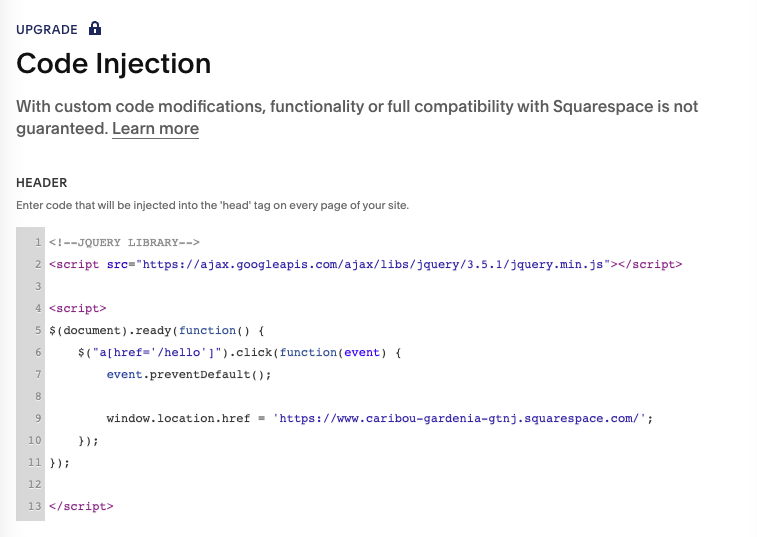
Add your code in the code injection header area. The sites will run this code on every page of your site.
We do not recommend doing this, as it might slow down all pages on your site. Unless you have multiple URLs that you’d like to redirect across your whole site. Then, it might be tedious to choose option #2.
Option #2:
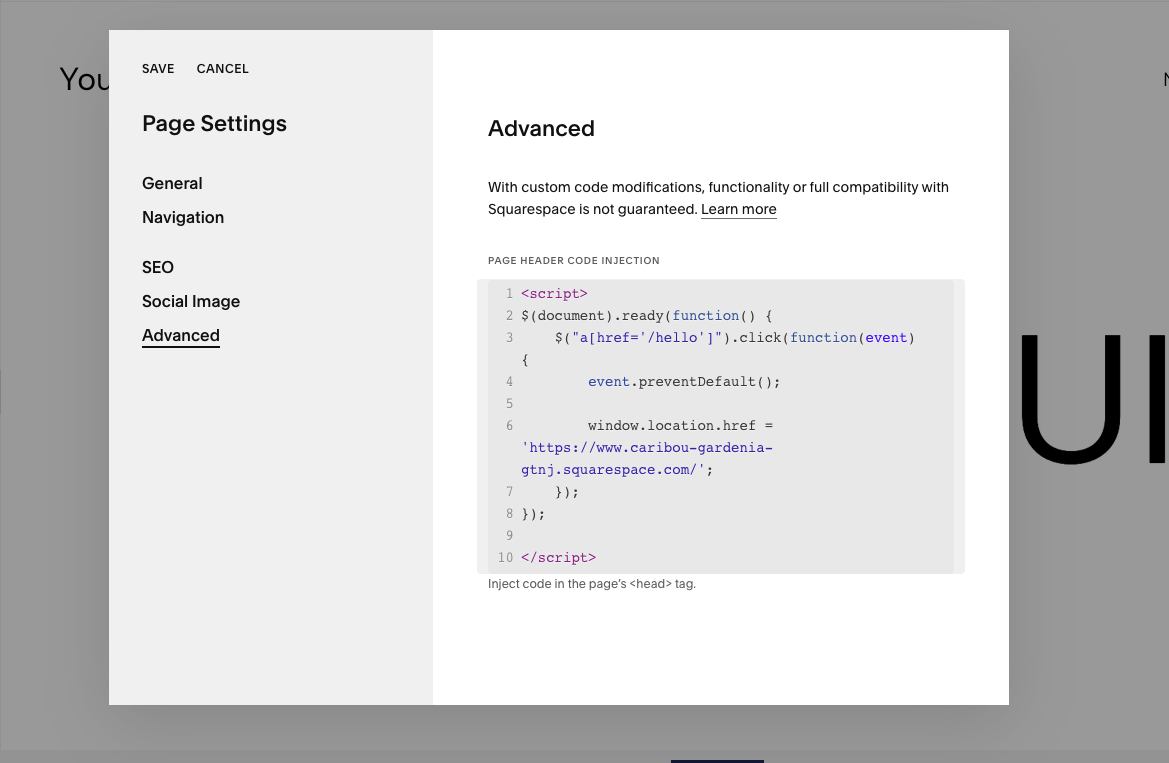
If the URL you’d like to redirect appears only on certain pages, you can add the code in the advanced page settings for those pages.
Add your code in your Page Settings → Advanced.
Is It A Good Idea to Add Codes To Your Squarespace Sites?
Adding code to your site might slow down your website. To avoid slowing your site significantly, please keep your code short and simple, and avoid redirecting too many pages.
Need Help With Your Squarespace Or Shopify Website?
Let us know your business and we can design your high-performing websites together.
